

Award B2B order points before payment is captured
Let B2B companies on payment terms earn points and move up amount spent tiers as soon as they place an order, instead of waiting for payment to be captured in Shopify.
By default, a company earns points for an order once payment is captured in Shopify. Many B2B companies buy on payment terms, and their invoices are settled outside Shopify, for example through an ERP. Those orders can stay at Payment pending in Shopify, so they never earn points.
The Order points timing setting lets B2B orders earn as soon as they are placed. It applies to your B2B program only. D2C orders still earn once payment is captured.
Change when B2B orders earn
Open your B2B points settings
Go to Loyalty Program → Points
Choose when order points are awarded
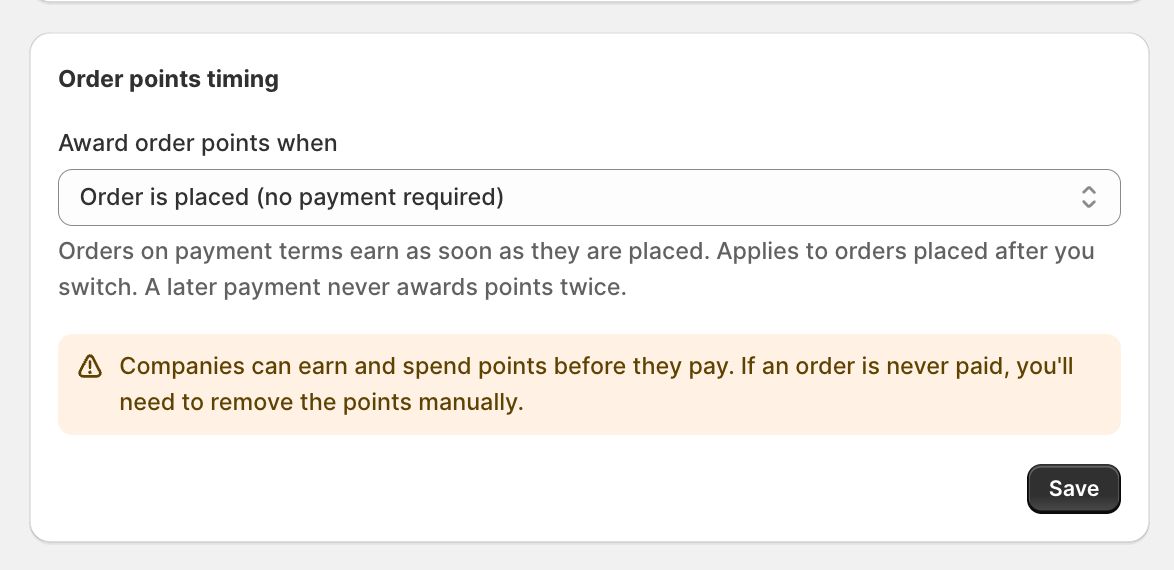
In the Order points timing card, Award order points when has two options:
- Order is paid: the default. Orders earn once payment is captured in Shopify.
- Order is placed (no payment required): orders on payment terms earn as soon as they are placed.
Select Order is placed (no payment required), then click Save. The admin shows this warning when the option is selected:
Companies can earn and spend points before they pay. If an order is never paid, you'll need to remove the points manually.

How it works
- Orders on payment terms earn as soon as they are placed. Your Place an order rule still decides how many points an order earns, with the same earning conditions, product eligibility and tier eligibility.
- It applies to orders placed after you switch. Orders placed before the change are not affected.
- A later payment never awards points twice. When the invoice is paid in Shopify, the order does not earn again.
Amount spent tiers
The same setting decides when an order counts toward a company's amount spent. With Order is placed (no payment required), the order value is added to the company's amount spent as soon as the order is placed, and the company's tier is checked straight away. If your B2B tiers are based on Amount spent, companies on payment terms move up tiers when they order, without waiting for payment. There is nothing extra to switch on.
For example, a company in Silver has spent $728 and Gold starts at $1,000. A buyer places a $300 order on payment terms. The moment it's placed, the company's amount spent becomes $1,028 and it moves into Gold, even though the invoice hasn't been paid. The tier promotion is recorded on the company's timeline.
With Order is paid, amount spent only goes up once payment is captured, so companies that never pay through Shopify stay in the same tier.
Orders that are never paid
With this option, a company can earn and spend points before it pays. If an order is never paid, Roadmap does not take the points back for you. Remove them manually from the company's balance, and build this into whatever process already chases unpaid invoices.
Refunds, returns and edits
Once an order has earned, refunds, returns and edits are handled the same way as for any other B2B order, through Fulfilled Order Adjustments. See Setting up B2B points: ways to earn and redeem.
Which option to use
- Keep Order is paid if companies pay at checkout or you capture payment in Shopify. Points then always represent money you have received.
- Choose Order is placed (no payment required) if companies buy on payment terms or pay through an ERP, and their orders are rarely marked as paid in Shopify. It's also the option to choose if you run amount spent tiers for those companies.