

Count only rated reviews in star averages
Keep reviews without a star rating, such as imported text-only reviews, out of your star averages and counts, and show rating and review counts separately on your storefront.
Some reviews don't have a star rating. This is common when you import reviews from a platform that only collected written reviews. By default, Roadmap includes every published review in the count beside your stars, so a batch of text-only reviews can make your ratings look out of step with your review list.
The Star ratings setting lets you count only reviews that have a star rating. Text-only reviews still appear on your product pages. They just don't affect the stars.
Change which reviews count
Open your review settings
In Roadmap, go to Reviews, open the Actions menu and click Settings.
Choose an option under Star ratings
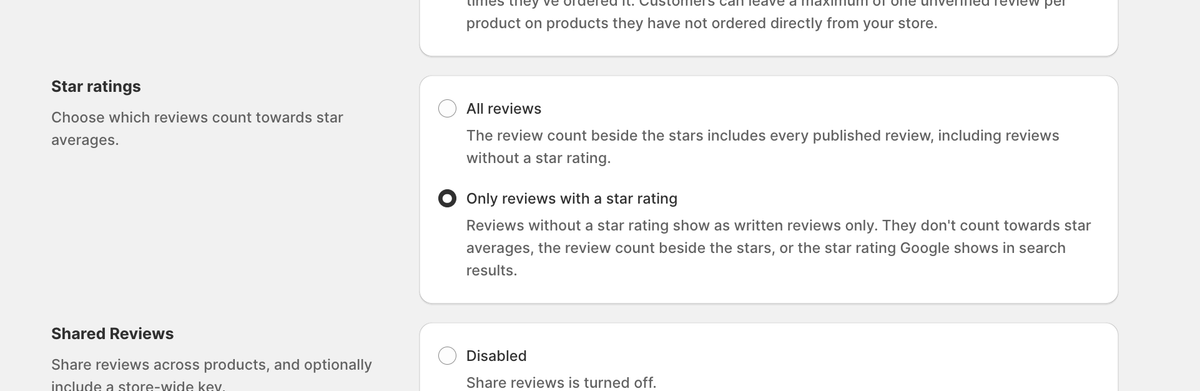
The Star ratings card has two options:
- All reviews: the default. The review count beside the stars includes every published review, including reviews without a star rating.
- Only reviews with a star rating: reviews without a star rating show as written reviews only. They don't count toward star averages, the review count beside the stars, or the star rating Google shows in search results.
Select Only reviews with a star rating, then save.

What changes on your storefront
With Only reviews with a star rating selected:
- Reviews without a rating show as written reviews only, with no stars. This is how unrated reviews always display.
- Star averages and the counts beside them only include reviews that have a star rating. This applies to the review badge, the review summary in the PDP review block, and the star rating Google shows in search results.
- Products whose reviews are all unrated don't show a star rating, but their written reviews still appear on the product page.
- New reviews collected through Roadmap keep the normal 1 to 5 star rating and count toward the average.
For example, a product with one 5-star review and three text-only reviews shows a 5-star average based on one rating. All four reviews still appear in the review list.
Show rating and review counts separately
When some reviews are unrated, "Based on 2 reviews" can look odd above a list of 10 reviews. You can change the text to show both counts, for example "Based on 2 ratings and 10 reviews".
In Edit Review Widgets, the variables are listed under each text field. Click a snippet to add it.
PDP Block: the Headline and Review summary with 1 or more reviews fields.
- Product title (
_product_title_): the title of the product the block sits on, e.g. Brain Wave. - Review count (
_review_count_): the number of reviews with a star rating, e.g. 24. - Average rating (
_avg_rating_): the average of all star ratings on the product, e.g. 4.6. - Total review count (
_total_review_count_): the number of all reviews, including ones left without a star rating, e.g. 31.
So a summary of Based on _review_count_ ratings and _total_review_count_ reviews renders as "Based on 2 ratings and 10 reviews".

Review Badge: the Text field uses {{ n }} for Review count and {{ total_n }} for Total review count. For example, {{ average_rating_1_decimal }} ({{ n }} ratings, {{ total_n }} reviews).
If every review in your store has a star rating, Review count and Total review count are the same, and nothing changes on your storefront.