

Getting started with Tag Library
Control storefront access with Secret Products, Protected Pages, eligibility rules, and scheduling.
Use Tag Library to control access to products, collections, and storefront URLs.
You do not need custom theme logic.
Pick the right setup
Use Secret Products when the rule applies to products or collections.
Use Protected Pages when the rule applies to a storefront URL.
What you can do with Tag Library
Use it to:
- show products only to approved customers
- hide products from specific audiences
- restrict landing pages or hidden URLs
- open or close access on a schedule
- redirect blocked visitors
- add password protection to pages
How setup works
When you open Tag Library, you can create tags, review existing ones, and confirm whether each tag is Draft or Active.

Create a new tag
From Tag Library, click Create a New Tag.
Pick the right tag type
Choose Secret Product for products or collections.
Choose Protected Pages for storefront URLs.
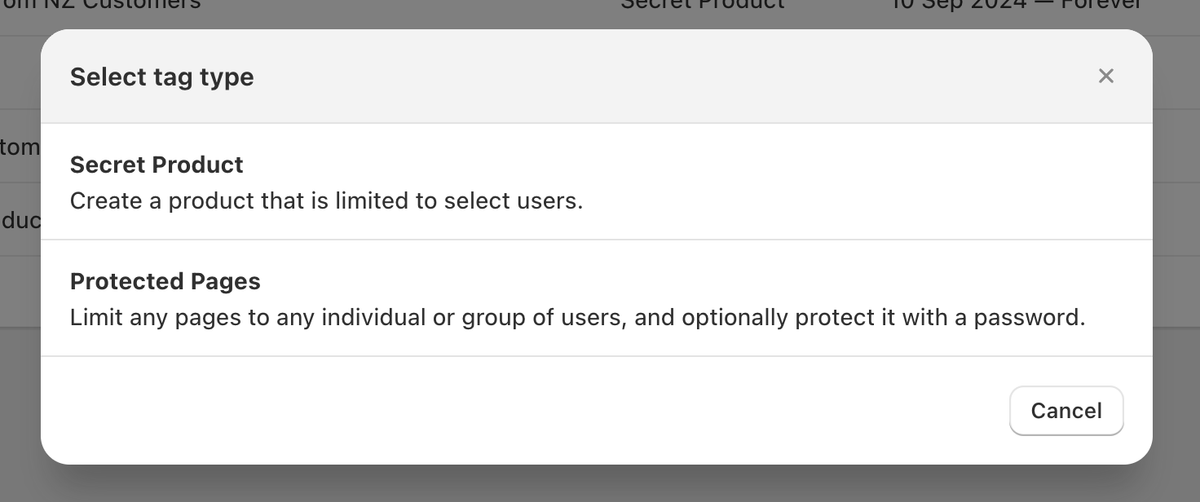
Configure the rule
Set the target, eligibility, redirect, and schedule.
Test in Draft
Check the rule with both eligible and ineligible customers.
Switch to Active
Turn the tag on only after testing passes.

Decide these settings first
Sort these five points before you build:
- what you are restricting: product, collection, or URL
- who should qualify
- whether the selected audience should be Visible or Hidden
- where blocked visitors should land
- whether access should start or end automatically
Use Secret Products when
Use Secret Products when access is tied to products or collections.
Common cases:
- wholesale-only catalogs
- VIP product drops
- country-based product access
- repeat-buyer bundles
Next step: Restrict products or collections in Tag Library
Use Protected Pages when
Use Protected Pages when access is tied to a URL.
Common cases:
- members-only landing pages
- hidden collection links
- campaign pages
- password-protected access pages
Next step: Creating Protected Pages in Tag Library
Core settings you will use most
Every tag type relies on the same controls:
- Customer Eligibility decides who qualifies
- Redirect ineligible customers to: controls where blocked visitors land
- Active Dates controls start and end times
- Status controls whether the rule is live
Read next:
- Customer eligibility controls in Tag Library
- Schedule start and end dates in Tag Library
Recommended first setups
Wholesale-only products
Use Secret Products.
Set products to Visible only for logged in customers tagged with your wholesale tag, such as Trade.
VIP early-access page
Use Protected Pages.
Restrict the page to the right audience, then add an end date if the page should open to everyone later.
Timed campaign or product drop
Use Active Dates on either tag type.
Set a clear start time. Add an end date if access should expire automatically.
Test before launch
Run this check before you activate the tag:
- the rule works for an eligible customer
- the rule blocks an ineligible customer
- the redirect path is correct
- the schedule is live now, if used
- the When inactive setting matches the result you want
If something is not working
Check these first:
- the tag is Active
- the eligibility rules match your test customer
- the redirect path is correct
- the schedule is live now
- the When inactive setting matches the outcome you want
Related guides
- Restrict products or collections in Tag Library
- Creating Protected Pages in Tag Library
- Customer eligibility controls in Tag Library
- Schedule start and end dates in Tag Library